Variables
Variables are used to store information, from Strings and Numbers to Objects(built-in or user-defined).
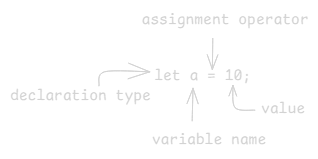
They can store any of JavaScript’s 8 data-types.
Declaration
A variable needs to be declared before it can be used.
JS
Copy
let a;          // variable declaration

console.log(a); // undefined
As you can see, since we haven’t initialized the variable it’ll return undefined.
Initialization
A uninitialized variable is not so useful. To initialize a variable you use the assignment operator '='
JS
Copy
a = 10;         // initialization

console.log(a); // 10
You can also declare and initialize a variable at the same type
JS
Copy
let a = 10;     // declaration and initialization

console.log(a)  //10
var
So far we've only been using let, but JavaScript have three declaration types, let, const and var.
var is what was used before the introduction of let and const in 2015 with ES6
var should not be used, unless it's a legacy project.
The main issue with var is its function-scoped, which introduces certain gotchas.
For example consider the following code:
JS
Copy
function someFunction() {
    for (var i = 0; i < 3; i++) {
        setTimeout(() => {
            console.log(i)
        }, 1000);
    }
}

someFunction();
You'd probably expect the following output:
JS
Copy
0
1
2
But the actual output is:
JS
Copy
3
3
3
This happens because var is scoped to the function and not the block, which means by the time setTimeout fires, the variable is 3
let
let is one of the three declaration types of let, const and var.
using let will fix the issue we had with var, since let is block-scoped, each iteration creates its own block-scoped let i
JS
Copy
function someFunction() {
    for (let i = 0; i < 3; i++) {
        setTimeout(() => {
            console.log(i)
        },1000);
    }
}

someFunction();

//output
0
1
2
let is re-assignable which means you can change its value;
JS
Copy
let a = 10;

a = 12;

console.log(a) // 12
const
const is one of the three declaration types of let, const and var.
const is constant in declaration, which means we cannot reassign a declared const variable.
JS
Copy
const a = 10;

a = 12; // illegal - TypeError: Assignment to constant variable.
For the same reason we also need to declare and initialize it at the same type.
But you can still change the value of const variables for example Arrays, and Objects
JS
Copy
const someArray = [1,2,3];
const someObject = {}

someArray.push(4);
someObject.name = "Lars"

console.log(someArray);  // [ 1, 2, 3, 4 ]
console.log(someObject); // { name: 'Lars' }