Asynchronous code in JavaScript
JavaScript is single threaded, and relies on the Event loop and promises to handle asynchronous execution.
JavaScript offloads asynchronous operations to web APIs like fetch or setTimeout.
Promises
JavaScript is single-threaded, so when we execute something asynchronous we immediately get a promise in return
A promise have three states; 'pending', 'fulfilled', 'rejected'.
You can describe a JavaScript Promise as a promise of a future value.
JS
Copy
const somePromise = new Promise((resolve) => {
    setTimeout(() => {
        resolve('Resolved!');
    }, 1000)
})

console.log(somePromise) // Promise { <Pending> }
As one can see by the above code, when we console log somePromise, it returns a pending Promise.
How do we handle what happens when the promise is resolved?
We can use the .then() method of Promise, which is called when a promise is resolved.
JS
Copy
const somePromise = new Promise((resolve) => {
    setTimeout(() => {
        resolve("Resolved!");
    }, 1000)
})

somePromise
    .then((result) => console.log(result)) // Resolved! (after 1 second)
To handle a rejected Promise, we can use the .catch() method of Promise.
JS
Copy
const somePromise = new Promise((resolve, reject) => {
    reject("Rejected!")
})

somePromise
    .then((result) => console.log(result)) // is never called.
    .catch((error) => console.log(error)); // Rejected!
async await
You can also declare a function as async, and use the await keyword inside of it.
await stops execution of the block until the awaited promise is resolved or rejected
But as with any other promise, if we console.log the function, we get a
We have to await the function call, to get the resolved value
JS
Copy
async function asyncFunction() {
    const response = await fetch('https://jsonplaceholder.typicode.com/users/1')
    return await response.json();
}

console.log(asyncFunction());      // Promise { <pending> }
console.log(await asyncFunction());// user json object
Event Loop
Since JavaScript is single-threaded it uses the Event Loop to manage asynchronous operations.
This is why when we console.log a Promise, or an async function we immediately see a Promise object
To understand why this is the case we need to understand the Event Loop.
The Event Loop manages the call stack, and two main queues, the macrotask queue and the microtask queue.
Synchronous code is added to the call stack, and executed immediately
Any .then() handler or code after an await statement are added to the microtask queue on Promise resolution
Callback APIs like setTimeout are added to the macro queue.
The Event Loop will execute everything in the call stack first, and when it's empty look in the microtask queue.
And only when both the call stack and microtask queue is empty will it look in the macrotask queue.
Consider the following code example, what is the order of execution?
JS
Copy
Promise.resolve().then(
    () => console.log(1)
)

setTimeout(() => console.log(2),0)

console.log(3)
Okay let's walk through it step by step.
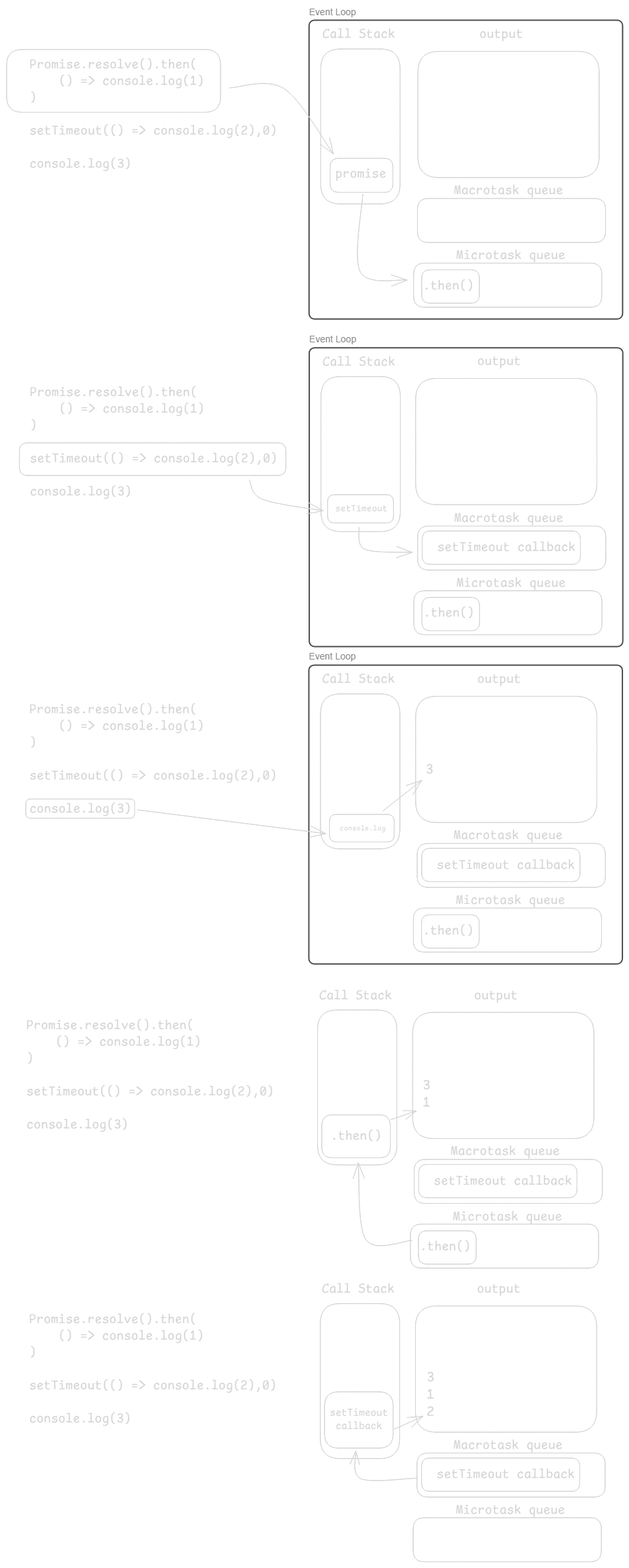
First we resolve a promise, and add the .then() handler to the microtask queue.
Then the setTimeout function is executed and we add its callback to the macrotask queue.
Then the console.log(3) is put on the call stack and executed.
The call stack is empty, so we execute any task in the microtask queue. In this case our .then() handler.
console.log(1) is executed.
Now the call stack and microtask queue is empty, we execute any task in the macrotask queue.
Which is our setTimeout callback, and console.log(2) is added to the call stack and executed.
So the order of the output of the code example is 3 1 2
JS
Copy
Promise.resolve().then(
    () => console.log(1)
)

setTimeout(() => console.log(2),0)

console.log(3)

// output
// 3
// 1
// 2